
Introduction
Before we start to learn the methods of Array, it's important to first get a basic of what an Array is? In case if you don't know.
So , What is an Array? In JavaScript, An Array is a special type of object which is used to store multiple elements under a single variable name. You can take an analogy of a grocery bag , which is used to hold multiple items in it.
Now the question arises that how can we declare it? One can declare an array by two ways:
- By using
new Array()keyword.
const groceryList = new Array("fruits", "vegetables", "cereals")
- By using
[]notation.
const groceryList = ["fruits", "vegetables", "cereals"]
So you got the basics!! Now let's jump to actual part that is methods of this 'samaan ka jhola' or can say Array 😅.
Methods in Array:
Array in javascript consist of various methods to work with. And these methods are broadly categorized based on how they work or what they do -
Modifying Methods
These methods mutates (changes) the original Array.
push/pop&shift/unshift: These methods are used to add or remove elements from start or end of the array.splice(start, deleteCount, ...items): This method is used to add / remove / replace the elements at specific position.sort&reverse: Rearranges the elements in place.
Non-Modifying Methods
These methods return a new, altered copy of the array without changing the original one.
map/filter/reduce: Transform or subset data based on callback functions.slice&concat: Extract subsets or merge arrays.flat/flatMap: Flatten nested arrays.
Iteration and Search Methods
forEach: Executes a function for each element.find/findIndex: Locates elements based on conditions.some/every: Tests if elements meet a condition (boolean).includes/indexOf/lastIndexOf: Searches for specific values.
Now let us understand few of them in detail to get to know to how to use them when needed :
push() and pop()
push() :
In JavaScript , Push method is used to insert the element in the end of the array. It adds the element and returns the updated size of the array.
You can understand it as a queue at a ticket counter where people enters from last of the line.
Syntax :
array.push("element1", "element2", .... , "elementN")
Example:
const items = ["pen", "book", "notebook"];
console.log(items.push("marker"));
// output: 4

console.log(items);
// output: ["pen", "book", "notebook", "marker"]
pop() :
Pop method is used to remove the element from the last of the array and returns the removed element. It removes only one element at a time after calling.
You can understand it as thinking of a stack of plates in which the last added plate is taken first.
Syntax :
array.pop();
Example :
const cars = ["Audi", "BMW", "Ferrari", "Mercedes", "Porsche"];
console.log(cars.pop());
// output: "Porsche"

console.log(cars);
//output: ["Audi", "BMW", "Ferrari", "Mercedes"]
shift() and unshift()
shift() :
Shift in javaScript works exactly like Pop method , but the only difference is that it removes the first element from the array and exactly like pop it returns the removed element.
Syntax :
array.shift()
Example :
const cars = ["Audi", "BMW", "Ferrari", "Mercedes", "Porsche"];
console.log(cars.shift());
// output: "Audi"

console.log(cars);
//output: ["BMW", "Ferrari", "Mercedes", "Porsche"]
unshift() :
As Shift is similar to Pop , Unshift also works exactly like Push method , but it adds the element to the start of the array. And like push it returns the size of the array.
Syntax :
array.unshift("element1", "element2", .... , "elementN")
Example :
const items = ["pen", "book", "notebook"];
console.log(items.unshift("marker"));
// output: 4

console.log(items);
// output: ["marker", "pen", "book", "notebook"]
map()
The map() method of array is used to create a new array by applying the required task on each element of the given array.
Syntax :
array.map(function(element, index, array) {
    return newElement;
})

// or by arrow function
array.map(element, index, array) => {
    return newElement;
})
here, "element" is the current element which have to be processed. "index" is the index of the element and "array" is the given array, but both are optional.
map() iterates over each and every element of an array and returns a new array after modifying each element by the callback function. Yes, you heard it right it passes a function using which we performs the required task on the elements. You will better understand it with a example.
Example :
const numbers = [1, 2, 3, 4];
const doubledNumbers = numbers.map(number => {
    return numbers*2;
})
console.log(doubledNumbers)

// output: [2, 4, 6, 8]
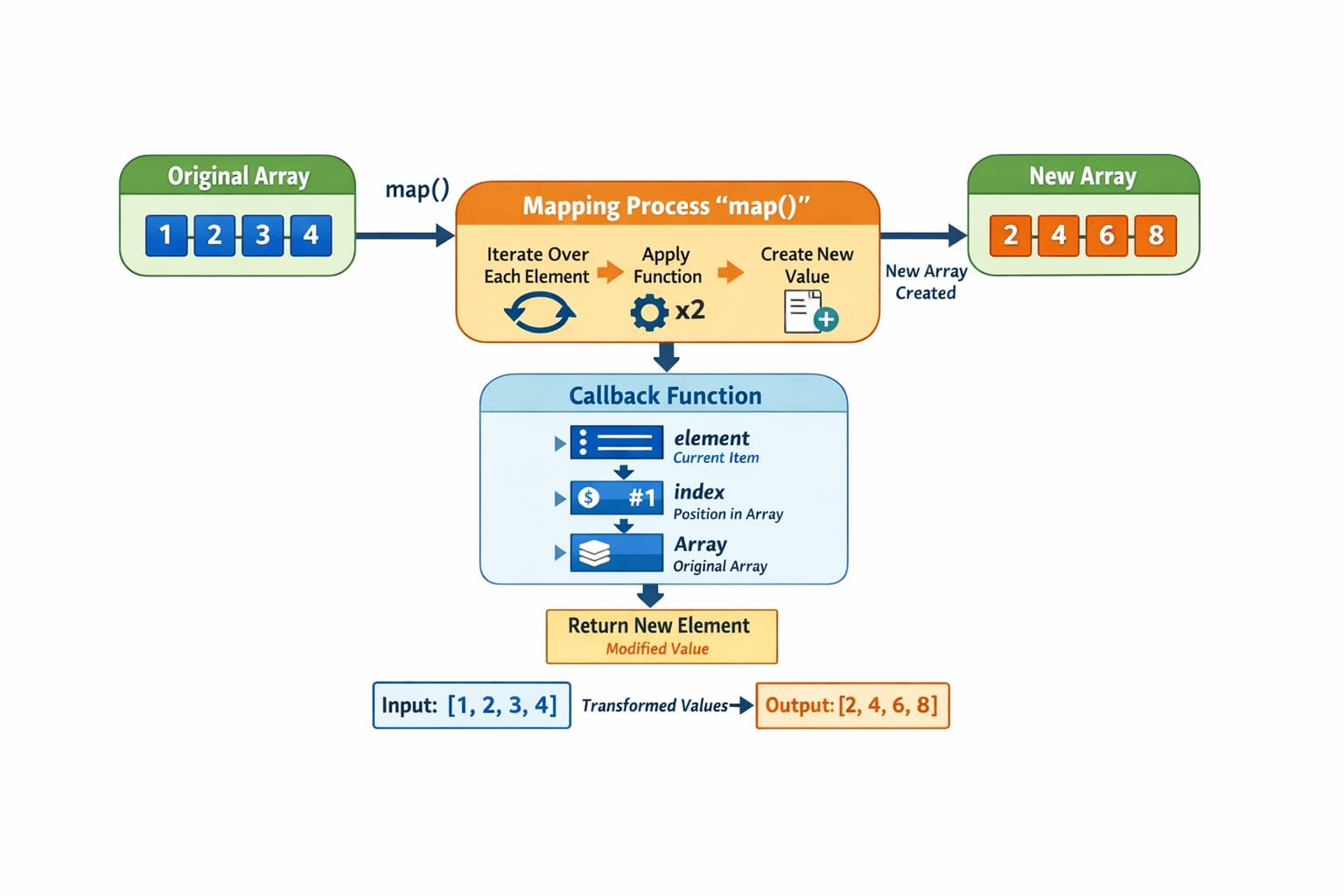
The above image will make it clear that how it works.
filter()
The filter() method of array is used to create a new array which contains only those elements which satisfy the given condition.
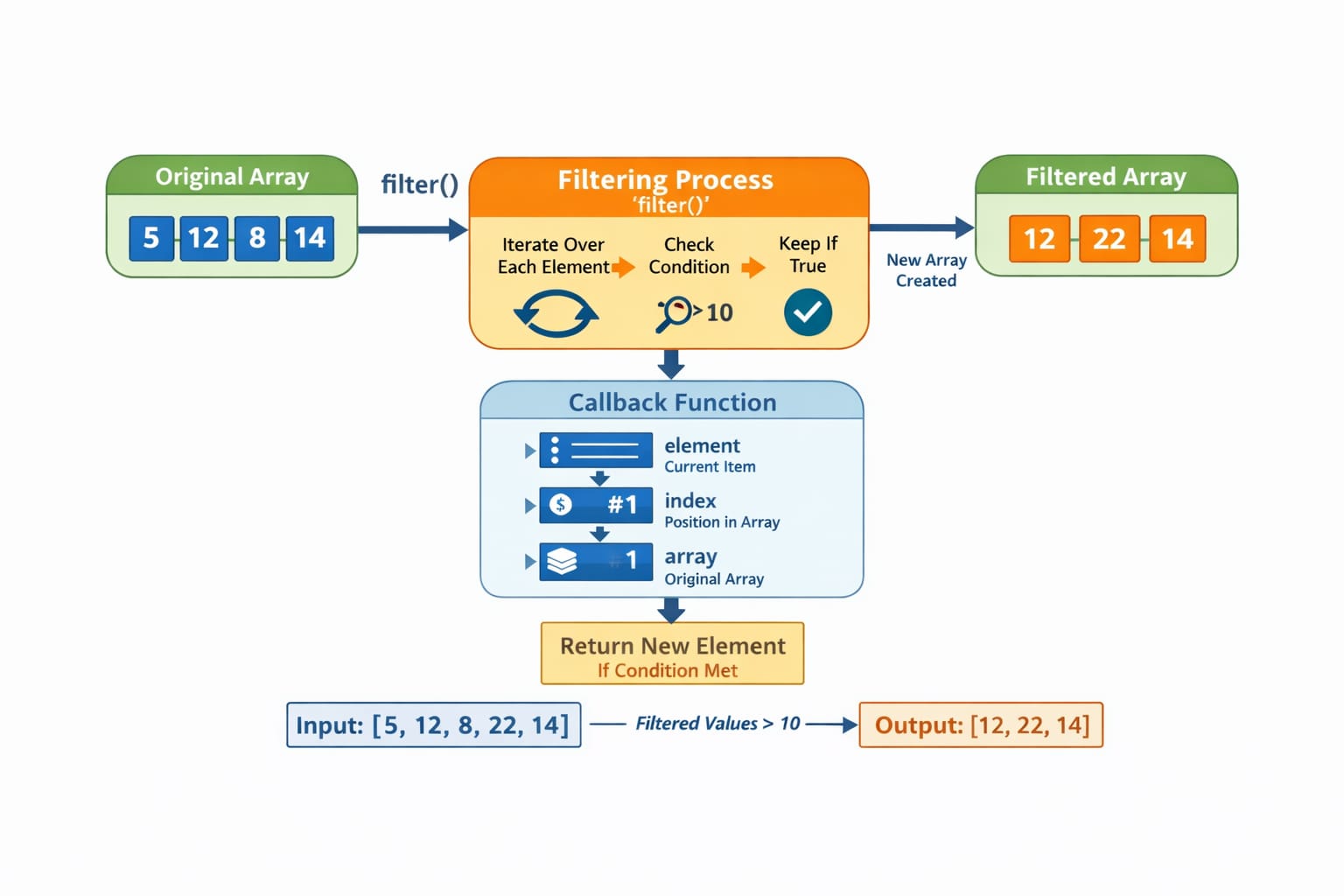
It test each element and passes only those in the new array which returns true for the given condition.
Syntax :
array.filter(function(element, index, array) => {
    return condition;
})

//by arrow function
array.filter((element, index, array) => {
    return condition;
})
filter() is an array method that returns a new array containing elements that passes a specified condition. Let us understand it with a example.
Example :
const numbers = [2, 5, 20, 35, 4, 10, 48];
const filteredNumber = numbers.filter(number => {
    return number > 10;
})
console.log(filteredNumber);
// output: [20, 35, 48]
reduce()
The reduce() method in JavaScript is used to convert an entire array into a single value by repeatedly applying a function to each element. You can perform various tasks using it like sum, product, or any other computation.
Syntax :
array.reduce(function(accumulator, currentValue, index, array){
    return updatedAccumulator;
}, initialValue)
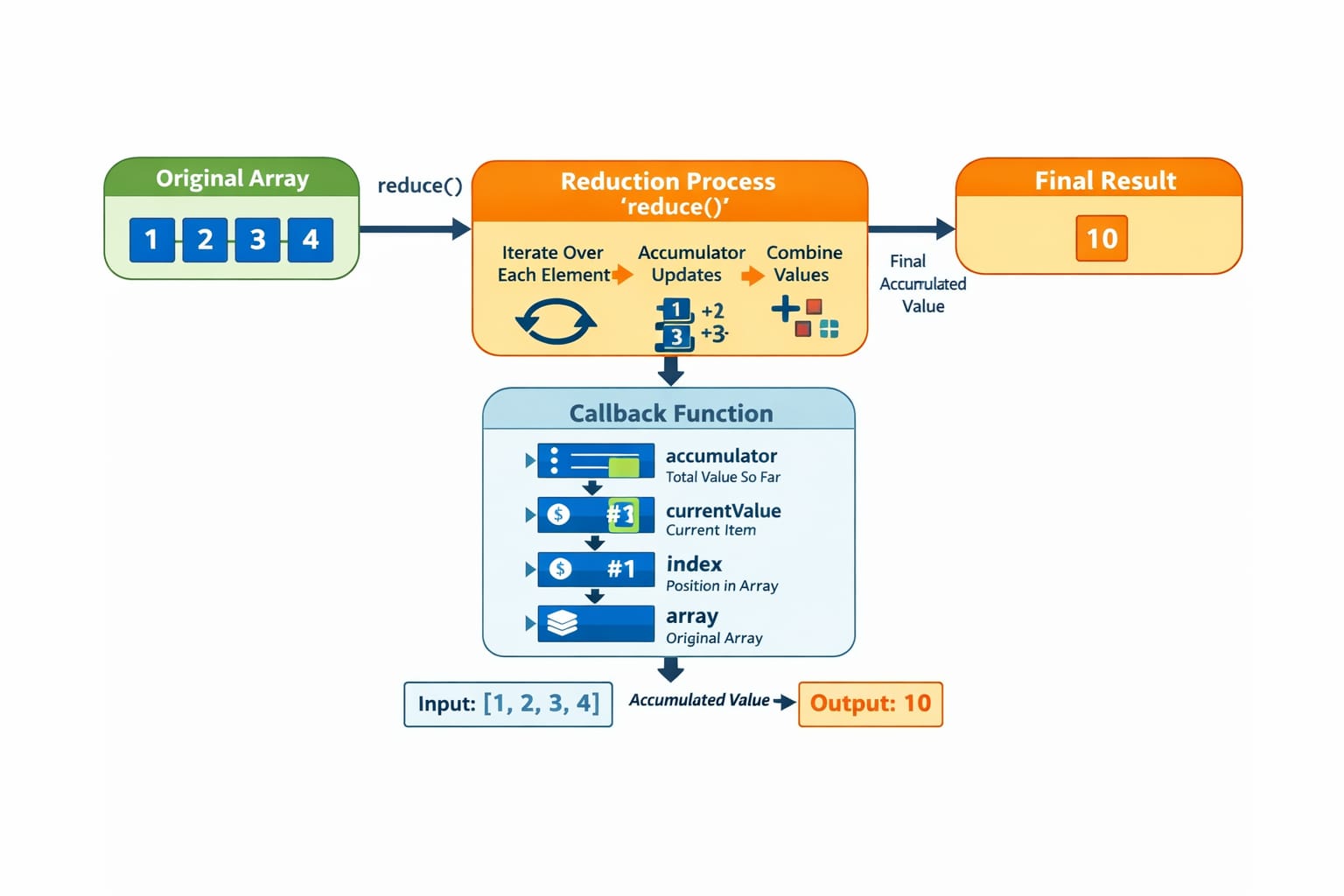
here, "accumulator" stores the resultant value, "currentValue" stores the current element being processed, "index" and "array" are same as above.
reduce() iterates through the array and accumulates the result into a single value using a callback function.
Example :
const numbers = [1, 2, 3, 4, 5];
const sum = numbers.reduce(acc, num => {
    return acc + num;
}, 0);

console.log(sum)
// output: 15
forEach()
forEach() method is a basic loop which iterates over each element and executes a function on each of them.
Syntax :
array.forEach(function(element, index, array) {
    // code to execute for each element
});
Example :
let numbers = [1, 2, 3, 4];

numbers.forEach(function(num) {
    console.log(num);
});
// output: 1
//         2
//         3
//         4


